Best AI Tools for Daily Life in 2026 (Real Use, No Hype)


Let’s be honest: AI isn’t some distant sci-fi concept anymore. But if you are looking for the best AI tools for daily life in 2026 has to offer, you usually have to wade through a lot of tech hype to find them. By now, the technology has quietly slipped into our routines—not as a robot butler, but as the invisible helper sorting our messy digital lives.
We aren’t talking about experimental code or complex enterprise platforms here. This is about the apps normal people actually use to kill boredom, save money, and get home earlier.
What “Normal People” Actually Want From Personal AI
Most of us couldn’t care less how the algorithm works. We just want to know if it actually helps.
In my experience, people only stick with an AI tool if it does one of four things:
- Saves time immediately (not next week).
- Fixes a daily annoyance, like scheduling.
- Works without needing a YouTube tutorial.
- Fits into the apps we already have on our phones.
The winners in 2026 don’t feel futuristic. They just feel useful.
Top AI Tools for Everyday Productivity
Productivity isn’t just about doing more work; it’s about reducing the friction in your daily tasks. Whether you are managing a busy household or just trying to clear your inbox, the right tools can handle the repetitive mental admin so you don’t have to.
AI Writing Assistants for Personal Use
Writing assistants aren’t just for digital nomads or bloggers anymore. We all have that one email we dread writing, or a text message we need to get just right. Everyday users are leaning on these tools for the boring stuff:
- Polishing up a grumpy email so it sounds professional.
- Summarising a massive group chat thread you missed.
- Fixing grammar before hitting send on an important application.
- Turning a few bullet points into a proper message.
If you want to dive deeper into the top AI productivity tools, you’ll see that these assistants save hours. Instead of staring at a blinking cursor for ten minutes, you just paste your rough notes, click a button, and it’s done.

AI for Personal Organization
LSmart AI for Personal Organization
Life involves way too much “admin” these days. AI is becoming the search engine for our own lives.
Think about how much time we waste scrolling to find things. Now, the tech lets us manage that overload by:
- Digging up old notes or ideas instantly.
- Searching through files just by asking a question.
- Keeping track of random goals and reminders without a complex system.
You don’t need to remember which folder you saved that PDF in. You just ask, “Where is my insurance policy?” and the app fetches it.

Best AI Apps for Home & Budget Management
Running a house feels like running a small business sometimes, just without the paycheck. Thankfully, the new wave of apps has moved past the gimmick phase to help with the heavy lifting.
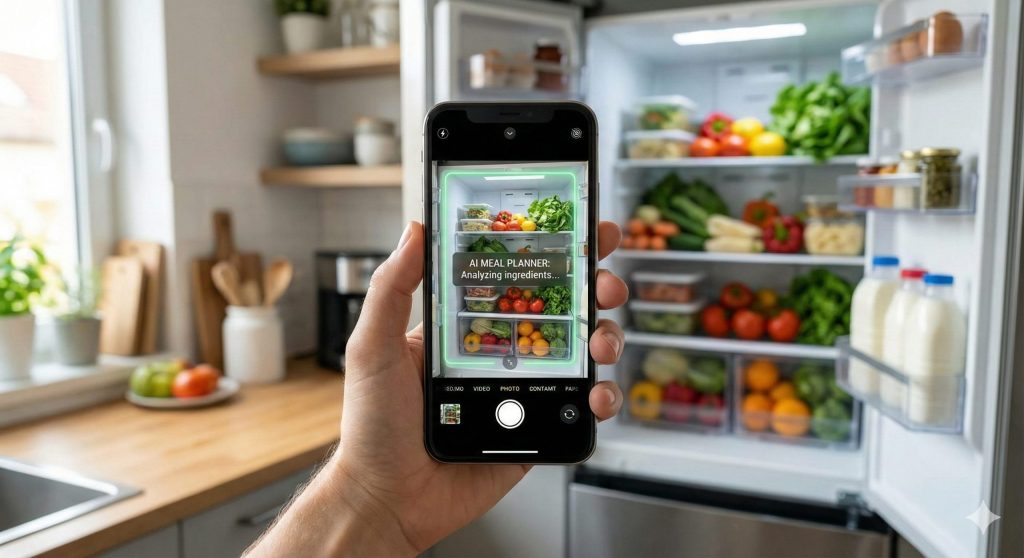
AI Meal Planners (The “Fridge Photo” Method)
The worst part of dinner is figuring out what to cook. That’s where the new kitchen assistants shine.
Real life: I tried this last Tuesday with random leftovers. Instead of ordering takeout, I got a decent stir-fry recipe in seconds.
How it works: You literally take a picture of your open fridge. The AI spots the ingredients—even that lonely jar of salsa—and lists 3 or 4 recipes you can make right now.
Why it sticks: It’s not about buying more food; it’s about using what you have.
Automated Budget Trackers & Finance AI
Traditional budgeting sucks because of the data entry. If you buy a coffee, you have to log it. Who has time for that?
The 2026 tools have largely solved this. Apps like YNAB and PocketGuard consistently rank among the best budget apps because they automate the boring parts entirely.
- No Setup: They hook into your bank securely and sort your spending automatically.
- Smart Alerts: You don’t get a boring graph; you get a heads-up.
- Peace of Mind: It’s nicer to see a notification saying, “You have $150 safe to spend this weekend,” rather than squinting at a spreadsheet.
FAQ: Getting Started with Daily AI Tools
If you’re still on the fence, you probably have a couple of worries about privacy and price.
Q: Is AI safe to use for personal data? A: It pays to be careful. If an app needs access to your calendar or bank, check if they offer “on-device processing.” That keeps your data on your phone hardware, rather than sending it off to a cloud server.
Q: Do I need a paid subscription? A: Rarely. The best tools for daily life usually operate on a “freemium” model. You can get the core features—like lists and basic calendar help—for free. You usually only pay if you need power-user features.
Conclusion
The “AI revolution” isn’t about robots taking our jobs. It’s about getting your Tuesday evening back.
Whether it’s auto-scheduling a dentist appointment or finally sorting out those thousands of family photos, these tools are built for utility.
Your Next Step: Don’t overwhelm yourself by downloading ten apps tonight. Just pick one thing that stresses you out—maybe it’s meal planning—and try a tool for that specific problem this week.



1 comment